In this project, an interactive Rock-Paper-Scissors game was created, in which the user can play with the computer using the camera.
-
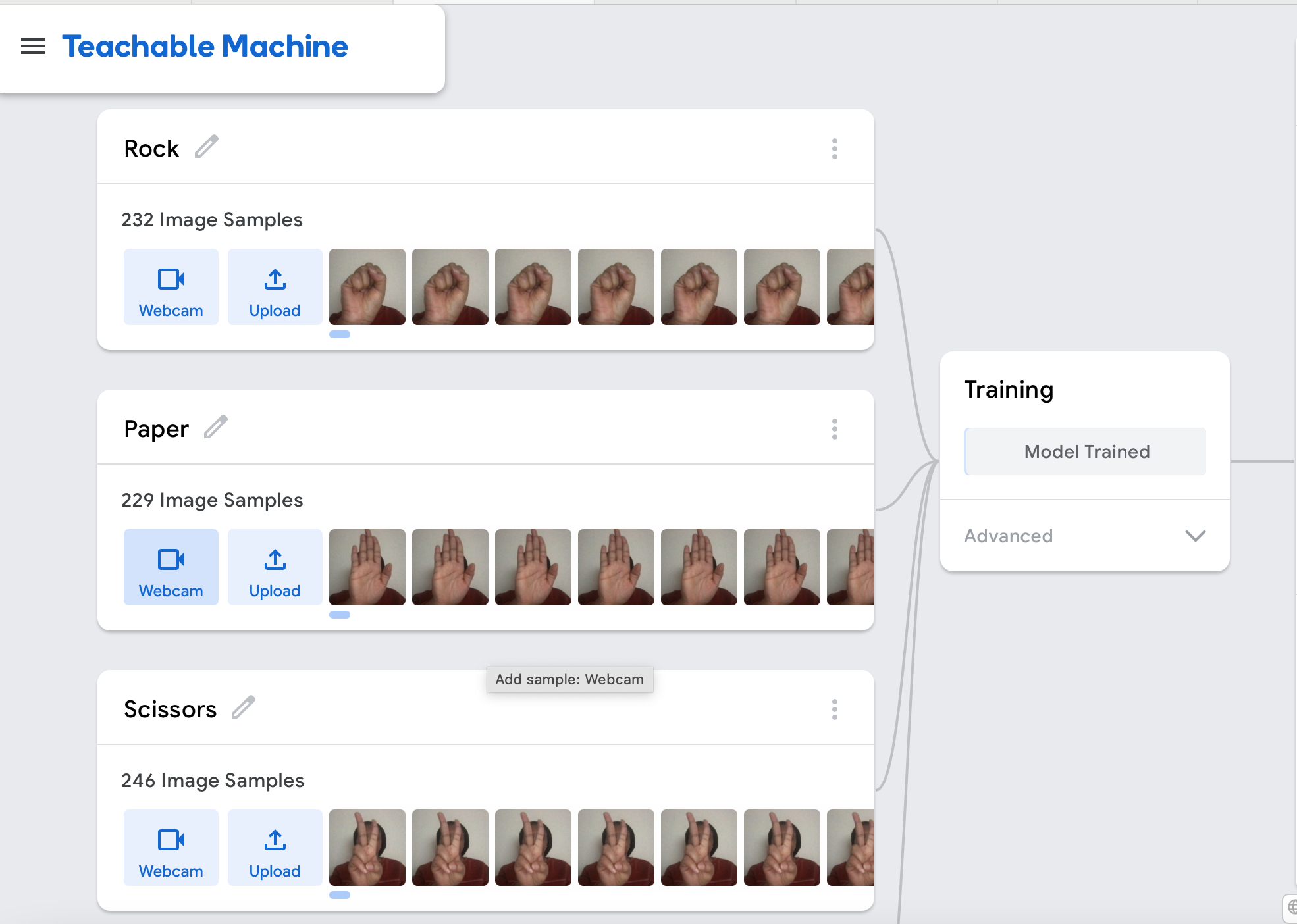
In this milestone, the Google Teachable Machine was used to create an image project model with four different classes: Rock, Paper, Scissors and Nothing. Google Teachable Machine is a web-based tool that makes creating machine learning models fast, easy, and accessible to everyone.
-
In the Teachable Machine, Images of myself showing the classes to the camera was trained, the model was then downloaded from the Tensorflow tab in Teachable-Machine to the computer.
- A virtual environment was created for this project using conda and all other packages was installed. Using the code below, the virtual environment was created, activated and packages(opencv-python, tensorflow and ipykernel) were installed.
"""
conda create -n Computer_Vision
conda activate Computer_Vision
conda install pip
pip install opencv-python
pip install tensorflow
pip install ipykernel

"""- The next step is running the downloaded model in the computer using the code below:
"""
import cv2
from keras.models import load_model
import numpy as np
model = load_model('keras_model.h5')
cap = cv2.VideoCapture(0)
data = np.ndarray(shape=(1, 224, 224, 3), dtype=np.float32)

while True:
    ret, frame = cap.read()
    resized_frame = cv2.resize(frame, (224, 224), interpolation = cv2.INTER_AREA)
    image_np = np.array(resized_frame)
    normalized_image = (image_np.astype(np.float32) / 127.0) - 1 # Normalize the image
    data[0] = normalized_image
    prediction = model.predict(data)
    cv2.imshow('frame', frame)
    # Press q to close the window
    if prediction[0][0] > 0.5:
        print('Rock')
    elif prediction[0][1] > 0.5:
        print('Paper')
    elif prediction[0][2] > 0.5:
        print('Scissors')
    else:
        print('Nothing')

    if cv2.waitKey(1) & 0xFF == ord('q'):
        break

# After the loop release the cap object
cap.release()
# Destroy all the windows
cv2.destroyAllWindows()

"""- The codes above shows that the variable predictions contains the output of the model, and each element in the output corresponds to a particular class - 'rock', 'paper', 'scissors' or 'nothing'. this statement runs once and if we click 'q' we will exit the while loop with a break.
- A python script is created to stimulate the game. The code will randomly choose a choice and ask the player to input their choice. Then using if-else statement the code will choose a winner base on the rules of Rock-Paper-Scissors. The codes are as follows:
"""
import random

while True:
    player_choice = input("enter a choice (rock, paper, scissors): ")
    possible_choicess = ["rock", "paper", "scissors"]
    computer_choice = random.choice(possible_choicess)
    print(f"\nYou chose {player_choice}, computer chose {computer_choice}.\n")

    if player_choice == computer_choice:
        print(f"Both players selected {player_choice}. It's a tie!")

    elif player_choice == "rock":
        if computer_choice == "scissors":
            print("Rock smashes scissors! You win!")
        else:
            print("Paper covers rock! You lose.")

    elif player_choice == "paper":
        if computer_choice == "rock":
            print("Paper covers rock! You win!")
        else:
            print("Scissors cuts paper! You lose.")

    elif player_choice == "scissors":
        if computer_choice == "paper":
            print("Scissors cuts paper! You win!")
        else:
            print("Rock smashes scissors! You lose.")

    play_again = input("Play again? (y/n): ")
    if play_again.lower() != "y":
        break

"""- These statements are created into a function that takes in the player and computer input as arguments and called.
"""
import random

def compare_winner(player_choice, computer_choice):
    computer_choice = random.choice(possible_choices)
    if player_choice == computer_choice:
        message = "It's a tie!"
        winner = "Draw"

    elif player_choice == "Rock":
        if computer_choice == "Scissors":
            message = "Rock smashes scissors! You win!"
            winner = "player"
        else:
            message = "Paper covers rock! You lose."
            winner = "computer"

    elif player_choice == "Paper":
        if computer_choice == "Rock":
            message = "Paper covers rock! You win!"
            winner = "player"
        else:
            message = "Scissors cuts paper! You lose."
            winner = "computer"

    elif player_choice == "Scissors":
        if computer_choice == "Paper":
            message = "Scissors cuts paper! You win!"
            winner = "player"
        else:
            message = "Rock smashes scissors! You lose."
            winner = "computer"

        return message, winner
"""- The webcam code and the function code is conbined to play the game. A countdown variable is created to show scores and rounds of the game. if the computer or players scores 3, the game ends. below is the code that starts the game with the camera and a screenshot of the game.
"""
if started:
        elapsed = 3 - (time.time() - counter)
        if not countdown:
            if elapsed <= -2:
                if player_score == 3:
                    message = "Game Over, Player Wins. Press 'q' to quit the game."
                elif computer_score == 3:
                    message = "Game over, Computer Wins press 'q' to quit the game."
                else:
                    message = "Press p to play the next round"
            if cv2.waitKey(33) == ord('p'):
                started = False
                elapsed = 0

        elif elapsed <= 0:
            countdown = False

            player_action = get_player_choice(prediction)
            computer_action = random.choice(possible_choices)
            the_winner = determine_winner(player_action, computer_action)

            if winner == "Player":
                player_score += 1
                round += 1
            elif winner == "Computer":
                computer_score += 1
                round += 1
            else:
                winner == "No one"
         if countdown:
            message = f'show your hand in {int(elapsed)} seconds'

 """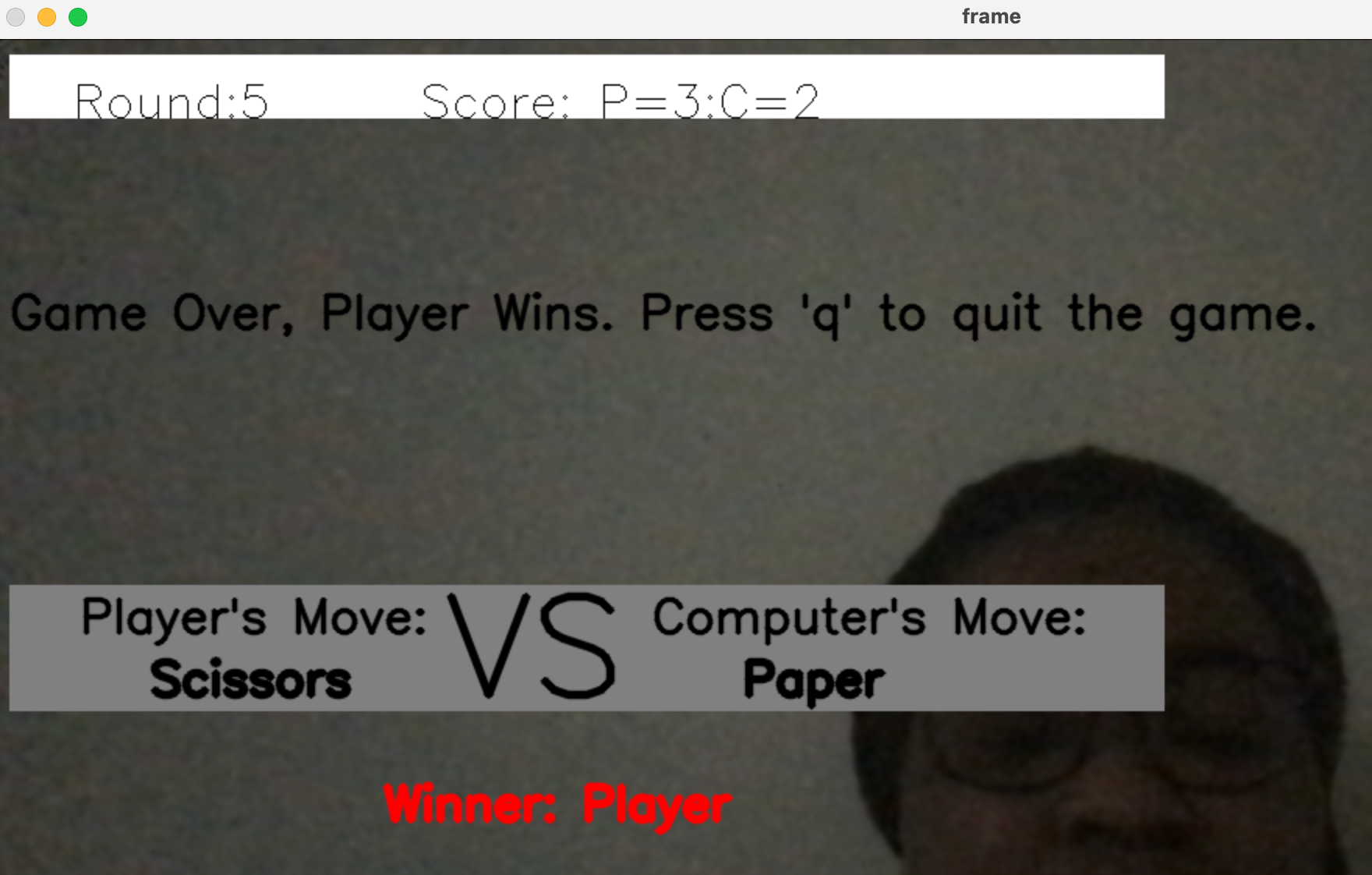
- The computer vision project for Rock, Paper, Scissors gane was successfully completed with the code above. To take this further, a target zone box for the hand detection for player and computer can be implemented