These modules are a collection of Rails view helpers intended to be used with CDRH Solr API sites.
- Pagination: UI paginator, tools for linking to different pages
- Faceting: rudimentary tools for faceting (expected to change somewhat drastically as new features / sites are built)
- Sorting: currently a simple tool for changing the sorting of the results

To add pagination like the above image to your new solr api site, use the following line in one of your rails views:
<div class="col-md-9 pagination_container">
  <%= paginator(total_pages) %>
</div>
The parameters that are passed to paginator are:
paginator(total_pages, display_pages, current_url_params)The default number of display_pages is three, as you can observe in the image above. By default, paginator also uses the rails params for the current page. If you would like to override those defaults, it would look something like this:
paginator(12, 5, {"controller" => "posts", "action" => "index", "page" => "12"})There are some additional helpers in the pagination module. To jump to a specific page using the current parameters (like the query term, selected facets, sorting, etc), you can use the to_page method.
<%= link_to "Page 12", to_page(12) %>Maybe you want to display some text to the user, like "0 results found" or "1000 results found!" Avoid using "result(s)" with the fun result_text method:
Found <%= result_count %> <%= result_text(result_count) %>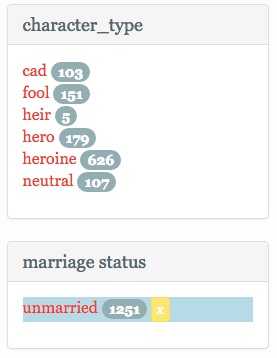
Currently, faceting in the sites works by only allowing you to pick one facet per category at a time (for example, only viewing results from the novel "emma" instead of being able to view both "emma" and "pride and prejudice"). There has been some discussion about changing that functionality, so it is not unlikely that everything is going to change about faceting.
Faceting currently works for a query by returning all the facets and number of results per facet available for the given query. If you click on a facet, an "fq" is added to the solr search which restricts the results to only things matching the selected facet. You can click on facets in multiple categories (example: restrict something by novel, character gender, and occupation) as you "drill down" into the results. Clicking an "X" next to a selected facet will remove only that facet from the query.
Here are some quick helpers for the faceting:
Clear the current search terms (not the facets)
<%= link_to clear_search %>Add a new facet (will not remove current facets / search terms)
# facet_link(facet_type, facet)
<%= link_to "Pride and Prejudice", search_path(facet_link("novel", "pride_and_prejudice")) %>
facet_selected? (returns bool)
<% selected = facet_selected?("sex", "female") %>remove_facet (not all facets, just a given facet)
<%= link_to "X", search_path(remove_facet("occupation", "soldier")) %>This one is pretty short for now and probably deserves a bit of thinking, but basically just change the sort parameter being passed to rails.
<%= link_to "Sort by novel", search_path(sort('novel')) %>