Conversation


|
The latest updates on your projects. Learn more about Vercel for GitHub.
|



📝 WalkthroughWalkthroughThis PR adds medium-zoom lightbox support with route-aware initialization, extensive hero image styling, updates many documentation image links to use Changes
Sequence Diagram(s)sequenceDiagram
participant User
participant Browser
participant Router
participant Theme as VitePress Theme
participant Zoom as medium-zoom
participant DOM as Document
User->>Browser: navigate / click link
Browser->>Router: route change
Router->>Theme: onAfterRouteChanged
Theme->>Theme: if not mounted -> mount tasks
Theme->>Zoom: initialize zoom on images
Zoom->>DOM: attach listeners / overlay elements
alt subsequent route change
Router->>Theme: route change
Theme->>Theme: watch triggers
Theme->>Zoom: reinitialize/refresh zoom on new images
Theme->>DOM: delay hash/tab handling until tabs render
end
User->>Browser: click image or change hash
Browser->>Zoom: open lightbox / hash triggers
Zoom->>DOM: show overlay and zoomed image
Estimated code review effort🎯 3 (Moderate) | ⏱️ ~22 minutes Poem
🚥 Pre-merge checks | ✅ 3✅ Passed checks (3 passed)
✏️ Tip: You can configure your own custom pre-merge checks in the settings. ✨ Finishing Touches🧪 Generate unit tests (beta)
Thanks for using CodeRabbit! It's free for OSS, and your support helps us grow. If you like it, consider giving us a shout-out. Comment |

![coderabbitai[bot]](https://avatars.githubusercontent.com/in/347564?s=60&v=4)

There was a problem hiding this comment.
Actionable comments posted: 4
Caution
Some comments are outside the diff and can’t be posted inline due to platform limitations.
⚠️ Outside diff range comments (4)
docs/.vitepress/theme/index.ts (1)
1-175:⚠️ Potential issue | 🟡 MinorPrettier formatting must be fixed.
The CI pipeline reports formatting issues. Run
prettier --writeon this file before merging.🤖 Prompt for AI Agents
Verify each finding against the current code and only fix it if needed.

In `@docs/.vitepress/theme/index.ts` around lines 1 - 175, Prettier is flagging
formatting issues in this module; run prettier --write on the file and commit
the resulting changes so the CI passes. Focus on reformatting the exported theme
object and surrounding helpers (e.g., DefaultTheme import and export block,
functions updateLayout, handleTabHash, setupTabHashUpdates,
updateHashOnTabClick, and initZoom/onMounted/watch usage) so spacing, trailing
commas, and indentation match the project's Prettier config, then stage and push
the formatted file.
docs/self-hosting/govern/instance-admin.md (2)
1-143:⚠️ Potential issue | 🟡 MinorPrettier formatting must be fixed.
The CI pipeline reports formatting issues. Run
prettier --writeon this file before merging.🤖 Prompt for AI Agents
Verify each finding against the current code and only fix it if needed.

In `@docs/self-hosting/govern/instance-admin.md` around lines 1 - 143, The file
"Instance admin and God mode" has CI-prettier formatting errors; run Prettier to
fix them by executing prettier --write on the document, then stage and commit
the updated file; specifically ensure the frontmatter, headings (e.g., "Instance
admin and God mode"), markdown lists, admonition blocks (::: info / ::: tip /
::: details), and image links (e.g.,
/images/instance-admin/god-mode-general.webp#hero) are properly formatted by
Prettier so the pipeline passes.
45-108:⚠️ Potential issue | 🟡 MinorImages missing alt text for accessibility.
Several images lack alternate text, which impacts accessibility for screen reader users and is flagged by markdownlint. Add descriptive alt text to each image.
📝 Proposed fixes
- +- +- +- +- +🤖 Prompt for AI Agents
Verify each finding against the current code and only fix it if needed. In `@docs/self-hosting/govern/instance-admin.md` around lines 45 - 108, The images in this markdown (the img markdown lines under the "Email", "Authentication", "Workspaces", "User management", and "Images in Plane" sections) are missing alt text; update each image markdown (e.g. lines like ) to include concise, descriptive alt text matching the section (for example "God Mode overview", "Email settings", "Authentication settings", "Workspaces management", "User management panel", "Image settings") and ensure alt text describes the image purpose (avoid purely decorative wording) so screen readers and markdownlint pass.docs/.vitepress/theme/style.css (1)
1-860:⚠️ Potential issue | 🟡 MinorPrettier formatting must be fixed.
The CI pipeline reports formatting issues. Run
prettier --writeon this file before merging.🤖 Prompt for AI Agents
Verify each finding against the current code and only fix it if needed.

In `@docs/.vitepress/theme/style.css` around lines 1 - 860, The file has Prettier
formatting errors; run Prettier to fix style inconsistencies (e.g., the top
`@import` lines like `@import` "tailwindcss/theme" layer(theme); and selectors such
as .api-endpoint-badge, .card-link, and .medium-zoom-image--opened) by running
prettier --write on this CSS (or via your editor/CI pre-commit hook) and commit
the reformatted docs/.vitepress/theme/style.css so the CI formatting check
passes.
🧹 Nitpick comments (3)
docs/.vitepress/theme/style.css (1)
672-800: Hero image styles lack dark mode support.The hero image container backgrounds use hardcoded light colors (
#f1f3f3,#eaebeb) without corresponding.darkvariants. This may cause poor contrast or visual inconsistency in dark mode.♻️ Proposed dark mode additions
Add after the light mode hero styles:
/* Dark mode hero image styles */
.dark .vp-doc p:has(> img[src$="#hero"]),
.dark article p:has(> img[src$="#hero"]),
.dark .vp-doc p:has(> img[src$="#hero-tl"]),
.dark article p:has(> img[src$="#hero-tl"]),
.dark .vp-doc p:has(> img[src$="#hero-tr"]),
.dark article p:has(> img[src$="#hero-tr"]),
.dark .vp-doc p:has(> img[src$="#hero-bl"]),
.dark article p:has(> img[src$="#hero-bl"]),
.dark .vp-doc p:has(> img[src$="#hero-br"]),
.dark article p:has(> img[src$="#hero-br"]) {
  background: `#1f1f1f`;
}

.dark .vp-doc img[src$="#hero"],
.dark article img[src$="#hero"],
.dark .vp-doc img[src$="#hero-tl"],
.dark article img[src$="#hero-tl"],
.dark .vp-doc img[src$="#hero-tr"],
.dark article img[src$="#hero-tr"],
.dark .vp-doc img[src$="#hero-bl"],
.dark article img[src$="#hero-bl"],
.dark .vp-doc img[src$="#hero-br"],
.dark article img[src$="#hero-br"] {
  border-color: `#2a2a2a`;
}
🤖 Prompt for AI Agents
Verify each finding against the current code and only fix it if needed.

In `@docs/.vitepress/theme/style.css` around lines 672 - 800, Hero image styles
use hardcoded light colors causing poor dark-mode contrast; add corresponding
.dark variants for the hero selectors (e.g. .vp-doc p:has(> img[src$="#hero"]),
article p:has(> img[src$="#hero"]), and the `#hero-tl/`#hero-tr/#hero-bl/#hero-br
variants) to set a dark background (e.g. `#1f1f1f`) and update the image
border-color for dark mode (e.g. `#2a2a2a`) so the hero container and image
borders display correctly in .dark theme.
docs/.vitepress/config.mts (1)
141-155: URL fragments in Open Graph images may be ignored.The
#herofragment appended toog:imageandtwitter:imageURLs will likely be stripped by social platforms when fetching the preview image. URL fragments are client-side only and not sent to servers.If the fragment is intended for internal documentation styling purposes, consider removing it from the meta tags since it has no effect on social previews.
♻️ Proposed fix
-      ["meta", { property: "og:image", content: "https://media.docs.plane.so/logo/og-docs.webp#hero" }],
+      ["meta", { property: "og:image", content: "https://media.docs.plane.so/logo/og-docs.webp" }],
- ["meta", { name: "twitter:image", content: "https://media.docs.plane.so/logo/og-docs.webp#hero" }], + ["meta", { name: "twitter:image", content: "https://media.docs.plane.so/logo/og-docs.webp" }],🤖 Prompt for AI Agents
Verify each finding against the current code and only fix it if needed.

In `@docs/.vitepress/config.mts` around lines 141 - 155, Remove the URL fragment
"#hero" from the Open Graph and Twitter image meta entries so the image URLs are
server-visible; update the ["meta", { property: "og:image", content:
"https://media.docs.plane.so/logo/og-docs.webp#hero" }] entry and the ["meta", {
name: "twitter:image", content:
"https://media.docs.plane.so/logo/og-docs.webp#hero" }] entry to use
"https://media.docs.plane.so/logo/og-docs.webp" (verify the image is reachable
at that URL and update any related references if necessary).
docs/.vitepress/theme/index.ts (1)
135-161: Missing cleanup for hashchange event listener.The
hashchangelistener added inonMountedis never removed. While this may not cause issues in production (single page load), it could lead to duplicate listeners during HMR in development.♻️ Proposed fix using onUnmounted
+import { onMounted, onUnmounted, watch, nextTick, h } from "vue";
-import { onMounted, watch, nextTick, h } from "vue";
Then in
setup():+ const handleHashChange = () => { + nextTick(handleTabHash); + }; + onMounted(() => { initZoom(); // Delay tab hash handling to ensure tabs are rendered setTimeout(() => { handleTabHash(); setupTabHashUpdates(); }, 100); // Listen for hash changes - window.addEventListener("hashchange", () => { - nextTick(handleTabHash); - }); + window.addEventListener("hashchange", handleHashChange); }); + + onUnmounted(() => { + window.removeEventListener("hashchange", handleHashChange); + zoom?.detach(); + });🤖 Prompt for AI Agents
Verify each finding against the current code and only fix it if needed.

In `@docs/.vitepress/theme/index.ts` around lines 135 - 161, The hashchange
listener added inside setup()’s onMounted is never removed; add an onUnmounted
callback that removes the same window "hashchange" listener (the one that calls
nextTick(handleTabHash)) and also detach the mediumZoom instance
(zoom?.detach()) and cancel any pending timers created for tab hash handling;
locate setup(), onMounted, nextTick(handleTabHash), handleTabHash,
setupTabHashUpdates, and the zoom variable to implement the cleanup so
HMR/development doesn't accumulate duplicate listeners.
🤖 Prompt for all review comments with AI agents
Verify each finding against the current code and only fix it if needed.
Inline comments:
In `@docs/self-hosting/govern/advanced-search.md`:
- Line 267: Replace the misspelled alt text "OpenSeach" with "OpenSearch" in the
image markdown reference (the string ``), updating the alt text to
`![OpenSearch flow]...` so the image alt is correct wherever that markdown
appears.
In `@docs/self-hosting/manage/manage-instance-users.md`:
- Around line 1-4: The frontmatter block is missing the required keywords field;
update the YAML frontmatter at the top of the document (the --- block containing
title and description) to include a keywords field (e.g., keywords: ["user
management","instance users","admins","God Mode"]) so the frontmatter contains
title, description, and keywords; ensure the keywords value is an array or
comma-separated string per project convention.
- Around line 1-61: Run Prettier on this Markdown file to fix CI formatting
errors: run `prettier --write` against the document that contains the
frontmatter (title/description) and headings like "Manage instance users" and
"Invite an instance admin"; ensure the YAML frontmatter remains valid, headings
and list indentations are normalized, and image/link alt/title syntax (e.g.,
User management image and invite-instance-admin image) is formatted consistently
before committing.
In `@docs/self-hosting/manage/upgrade-plane.md`:
- Line 23: The image in upgrade-plane.md currently references an external URL
("https://media.docs.plane.so/product/check-version.webp#hero#center") and uses
an unusual double-fragment "#hero#center"; move the file into the
docs/.vitepress/public/images/ directory, update the markdown image reference to
the absolute local path (/images/check-version.webp) and remove or normalize the
fragment to the intended pattern (e.g., "#hero" or "#center") so it matches
other images in this document and the project's image path guideline.
---
Outside diff comments:
In `@docs/.vitepress/theme/index.ts`:
- Around line 1-175: Prettier is flagging formatting issues in this module; run
prettier --write on the file and commit the resulting changes so the CI passes.
Focus on reformatting the exported theme object and surrounding helpers (e.g.,
DefaultTheme import and export block, functions updateLayout, handleTabHash,
setupTabHashUpdates, updateHashOnTabClick, and initZoom/onMounted/watch usage)
so spacing, trailing commas, and indentation match the project's Prettier
config, then stage and push the formatted file.
In `@docs/.vitepress/theme/style.css`:
- Around line 1-860: The file has Prettier formatting errors; run Prettier to
fix style inconsistencies (e.g., the top `@import` lines like `@import`
"tailwindcss/theme" layer(theme); and selectors such as .api-endpoint-badge,
.card-link, and .medium-zoom-image--opened) by running prettier --write on this
CSS (or via your editor/CI pre-commit hook) and commit the reformatted
docs/.vitepress/theme/style.css so the CI formatting check passes.
In `@docs/self-hosting/govern/instance-admin.md`:
- Around line 1-143: The file "Instance admin and God mode" has CI-prettier
formatting errors; run Prettier to fix them by executing prettier --write on the
document, then stage and commit the updated file; specifically ensure the
frontmatter, headings (e.g., "Instance admin and God mode"), markdown lists,
admonition blocks (::: info / ::: tip / ::: details), and image links (e.g.,
/images/instance-admin/god-mode-general.webp#hero) are properly formatted by
Prettier so the pipeline passes.
- Around line 45-108: The images in this markdown (the img markdown lines under
the "Email", "Authentication", "Workspaces", "User management", and "Images in
Plane" sections) are missing alt text; update each image markdown (e.g. lines
like ) to include concise,
descriptive alt text matching the section (for example "God Mode overview",
"Email settings", "Authentication settings", "Workspaces management", "User
management panel", "Image settings") and ensure alt text describes the image
purpose (avoid purely decorative wording) so screen readers and markdownlint
pass.
---
Nitpick comments:
In `@docs/.vitepress/config.mts`:
- Around line 141-155: Remove the URL fragment "#hero" from the Open Graph and
Twitter image meta entries so the image URLs are server-visible; update the
["meta", { property: "og:image", content:
"https://media.docs.plane.so/logo/og-docs.webp#hero" }] entry and the ["meta", {
name: "twitter:image", content:
"https://media.docs.plane.so/logo/og-docs.webp#hero" }] entry to use
"https://media.docs.plane.so/logo/og-docs.webp" (verify the image is reachable
at that URL and update any related references if necessary).
In `@docs/.vitepress/theme/index.ts`:
- Around line 135-161: The hashchange listener added inside setup()’s onMounted
is never removed; add an onUnmounted callback that removes the same window
"hashchange" listener (the one that calls nextTick(handleTabHash)) and also
detach the mediumZoom instance (zoom?.detach()) and cancel any pending timers
created for tab hash handling; locate setup(), onMounted,
nextTick(handleTabHash), handleTabHash, setupTabHashUpdates, and the zoom
variable to implement the cleanup so HMR/development doesn't accumulate
duplicate listeners.
In `@docs/.vitepress/theme/style.css`:
- Around line 672-800: Hero image styles use hardcoded light colors causing poor
dark-mode contrast; add corresponding .dark variants for the hero selectors
(e.g. .vp-doc p:has(> img[src$="#hero"]), article p:has(> img[src$="#hero"]),
and the `#hero-tl/`#hero-tr/#hero-bl/#hero-br variants) to set a dark background
(e.g. `#1f1f1f`) and update the image border-color for dark mode (e.g. `#2a2a2a`) so
the hero container and image borders display correctly in .dark theme.
ℹ️ Review info
⚙️ Run configuration
Configuration used: defaults
Review profile: CHILL
Plan: Pro
Run ID: f9997ad7-d6a4-47f7-b4e5-7a7c0b5a6096
⛔ Files ignored due to path filters (1)
pnpm-lock.yamlis excluded by!**/pnpm-lock.yaml
📒 Files selected for processing (28)
docs/.vitepress/config.mtsdocs/.vitepress/theme/index.tsdocs/.vitepress/theme/style.cssdocs/public/images/instance-admin/god-mode-authentication.webpdocs/public/images/instance-admin/god-mode-email.webpdocs/public/images/instance-admin/god-mode-general.webpdocs/public/images/instance-admin/god-mode-workspaces.webpdocs/public/images/instance-admin/invite-instance-admin.webpdocs/public/images/instance-admin/user-actions.webpdocs/public/images/instance-admin/user-management.webpdocs/self-hosting/govern/advanced-search.mddocs/self-hosting/govern/instance-admin.mddocs/self-hosting/govern/integrations/github.mddocs/self-hosting/govern/integrations/gitlab.mddocs/self-hosting/govern/integrations/slack.mddocs/self-hosting/govern/ldap.mddocs/self-hosting/govern/oidc-sso.mddocs/self-hosting/govern/saml-sso.mddocs/self-hosting/manage/manage-instance-users.mddocs/self-hosting/manage/manage-licenses/activate-airgapped-enterprise.mddocs/self-hosting/manage/manage-licenses/activate-airgapped.mddocs/self-hosting/manage/manage-licenses/activate-enterprise.mddocs/self-hosting/manage/upgrade-plane.mddocs/self-hosting/manage/view-logs.mddocs/self-hosting/methods/airgapped-requirements.mddocs/self-hosting/plane-architecture.mddocs/self-hosting/telemetry.mdpackage.json
| ### The complete flow | ||
|
|
||
|  | ||
|  |
There was a problem hiding this comment.
Typo in image alt text: "OpenSeach" should be "OpenSearch".
📝 Proposed fix
-
+📝 Committable suggestion
‼️ IMPORTANT
Carefully review the code before committing. Ensure that it accurately replaces the highlighted code, contains no missing lines, and has no issues with indentation. Thoroughly test & benchmark the code to ensure it meets the requirements.
|  | |
|  |
🤖 Prompt for AI Agents
Verify each finding against the current code and only fix it if needed.
In `@docs/self-hosting/govern/advanced-search.md` at line 267, Replace the
misspelled alt text "OpenSeach" with "OpenSearch" in the image markdown
reference (the string ``), updating the alt text to
`![OpenSearch flow]...` so the image alt is correct wherever that markdown
appears.
| --- | ||
| title: User management | ||
| description: Manage instance users, invite instance admins, and control access to God Mode. | ||
| --- |
There was a problem hiding this comment.
Missing keywords field in frontmatter.
As per coding guidelines, every markdown page requires frontmatter with title, description, and keywords fields.
📝 Proposed fix
 ---
 title: User management
 description: Manage instance users, invite instance admins, and control access to God Mode.
+keywords: plane user management, instance admin, god mode, enterprise, self-hosting admin
 ---
As per coding guidelines: "Every markdown page requires frontmatter with title, description, and keywords fields"
📝 Committable suggestion
‼️ IMPORTANT
Carefully review the code before committing. Ensure that it accurately replaces the highlighted code, contains no missing lines, and has no issues with indentation. Thoroughly test & benchmark the code to ensure it meets the requirements.
| --- | |
| title: User management | |
| description: Manage instance users, invite instance admins, and control access to God Mode. | |
| --- | |
| --- | |
| title: User management | |
| description: Manage instance users, invite instance admins, and control access to God Mode. | |
| keywords: plane user management, instance admin, god mode, enterprise, self-hosting admin | |
| --- |
🧰 Tools
🪛 GitHub Actions: CI
[warning] 1-1: Prettier formatting issues found. Run 'prettier --write' to fix this file.
🤖 Prompt for AI Agents
Verify each finding against the current code and only fix it if needed.

In `@docs/self-hosting/manage/manage-instance-users.md` around lines 1 - 4, The
frontmatter block is missing the required keywords field; update the YAML
frontmatter at the top of the document (the --- block containing title and
description) to include a keywords field (e.g., keywords: ["user
management","instance users","admins","God Mode"]) so the frontmatter contains
title, description, and keywords; ensure the keywords value is an array or
comma-separated string per project convention.
| --- | ||
| title: User management | ||
| description: Manage instance users, invite instance admins, and control access to God Mode. | ||
| --- | ||
|
|
||
| # Manage instance users <Badge type="warning" text="Enterprise" /> | ||
|
|
||
| User management lets instance admins view all users across the instance and manage their access. This is separate from workspace-level member management. | ||
|
|
||
| ## View users | ||
|
|
||
| Go to **God Mode → User Management** to see all users in the instance. | ||
|
|
||
|  | ||
|
|
||
| The table displays: | ||
|
|
||
| | Column | Description | | ||
| |--------|-------------| | ||
| | Full Name | User's full name | | ||
| | Display Name | User's display name | | ||
| | Email | User's email address | | ||
| | Account Type | User or Instance Admin | | ||
| | Status | Active or Suspended | | ||
| | Joining Date | When the user joined | | ||
|
|
||
| Use the search bar to find specific users. | ||
|
|
||
| ## Invite an instance admin | ||
|
|
||
| Instance admins have access to God Mode but are not automatically added to any workspace. | ||
|
|
||
| 1. Click **Invite members**. | ||
| 2. Enter the user's email and password. | ||
| 3. Optionally enable: | ||
| - **Generate random password** — auto-create a password | ||
| - **Prompt user to change password after onboarding** — require password reset on first login | ||
| 4. Click **Invite**. | ||
|
|
||
|  | ||
|
|
||
| :::warning | ||
| No invitation email is sent. You must share the credentials with the user manually. | ||
| ::: | ||
|
|
||
| ## Manage user access | ||
|
|
||
| Click **…** next to any user to: | ||
|
|
||
| - **Grant admin access** — promote a user to Instance Admin. | ||
| - **Remove admin access** — downgrade an Instance Admin to a regular user (loses God Mode access). | ||
| - **Remove** — remove the user from the instance entirely. | ||
|
|
||
|  | ||
|
|
||
| ## User status | ||
|
|
||
| | Status | Description | | ||
| |--------|-------------| | ||
| | Active | User can access the instance | | ||
| | Suspended | User account exists but cannot access the instance | No newline at end of file |
There was a problem hiding this comment.
Prettier formatting must be fixed.
The CI pipeline reports formatting issues. Run prettier --write on this file before merging.
🧰 Tools
🪛 GitHub Actions: CI
[warning] 1-1: Prettier formatting issues found. Run 'prettier --write' to fix this file.
🤖 Prompt for AI Agents
Verify each finding against the current code and only fix it if needed.

In `@docs/self-hosting/manage/manage-instance-users.md` around lines 1 - 61, Run
Prettier on this Markdown file to fix CI formatting errors: run `prettier
--write` against the document that contains the frontmatter (title/description)
and headings like "Manage instance users" and "Invite an instance admin"; ensure
the YAML frontmatter remains valid, headings and list indentations are
normalized, and image/link alt/title syntax (e.g., User management image and
invite-instance-admin image) is formatted consistently before committing.
| You can quickly check your Plane version by clicking the **?** icon on the sidebar. | ||
|
|
||
| 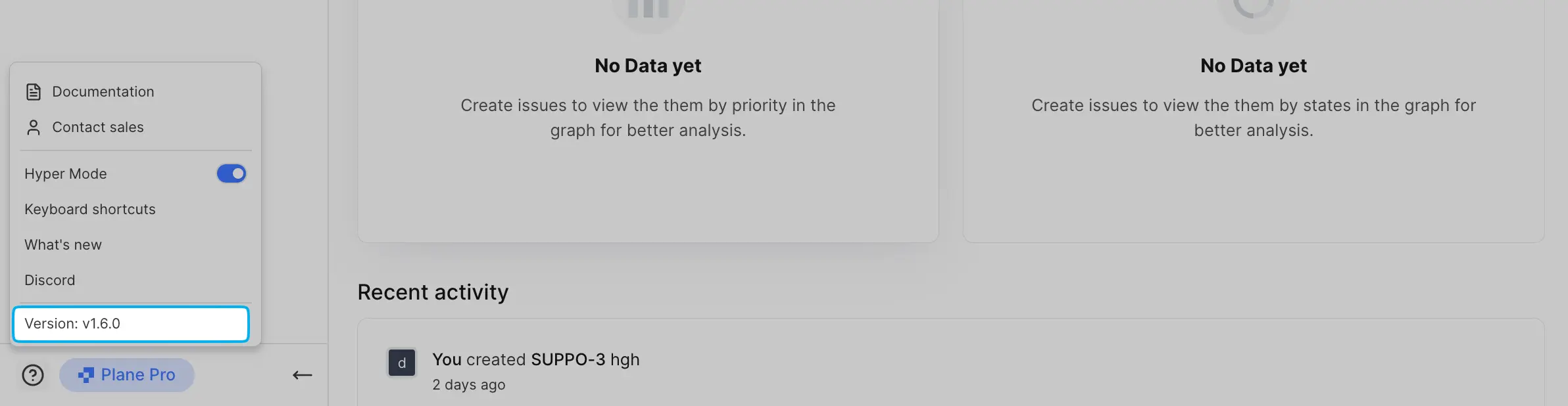 | ||
|  |
There was a problem hiding this comment.
Inconsistent image path: external URL instead of local /images/... path.
This image uses an external URL (https://media.docs.plane.so/...) while the coding guidelines specify storing images in docs/.vitepress/public/images/ and referencing them with absolute /images/... paths. Other images in this file (e.g., line 89) follow the local path convention.
Consider moving this image to the local images directory for consistency.
Additionally, the #hero#center double-fragment is unusual—verify this is the intended pattern for combining hero styling with centering.
As per coding guidelines: "Store images in docs/.vitepress/public/images/ and reference them with absolute paths using /images/... notation"
🤖 Prompt for AI Agents
Verify each finding against the current code and only fix it if needed.

In `@docs/self-hosting/manage/upgrade-plane.md` at line 23, The image in
upgrade-plane.md currently references an external URL
("https://media.docs.plane.so/product/check-version.webp#hero#center") and uses
an unusual double-fragment "#hero#center"; move the file into the
docs/.vitepress/public/images/ directory, update the markdown image reference to
the absolute local path (/images/check-version.webp) and remove or normalize the
fragment to the intended pattern (e.g., "#hero" or "#center") so it matches
other images in this document and the project's image path guideline.
There was a problem hiding this comment.
Caution
Some comments are outside the diff and can’t be posted inline due to platform limitations.
⚠️ Outside diff range comments (1)
docs/self-hosting/govern/instance-admin.md (1)
1-150:⚠️ Potential issue | 🔴 CriticalFix Prettier formatting issues before merge.
The CI pipeline detected Prettier formatting violations in this file. Per coding guidelines, all markdown files must pass Prettier checks with the project's configuration (120-character line width, 2-space indent, etc.).
Run the following command to fix formatting:
prettier --write docs/self-hosting/govern/instance-admin.md🤖 Prompt for AI Agents
Verify each finding against the current code and only fix it if needed.

In `@docs/self-hosting/govern/instance-admin.md` around lines 1 - 150, The file
"Instance admin and God mode" (frontmatter title) has Prettier formatting
violations; run the project's Prettier with the repo config (e.g., prettier
--write docs/self-hosting/govern/instance-admin.md) or via your editor/IDE to
reformat to the 120-char line width and 2-space indent, then stage and commit
the updated docs/self-hosting/govern/instance-admin.md so CI passes.
🧹 Nitpick comments (1)
docs/self-hosting/govern/instance-admin.md (1)
98-98: Consider using "Revoke" for clarity.For admin access control, "revoke" is more precise than "remove" when referring to removing permissions rather than deleting the user entirely.
✍️ Suggested refinement
-- Grant or remove admin access for existing users
+- Grant or revoke admin access for existing users
🤖 Prompt for AI Agents
Verify each finding against the current code and only fix it if needed.

In `@docs/self-hosting/govern/instance-admin.md` at line 98, Change the heading
text "Grant or remove admin access for existing users" to use "revoke" for
clarity—update the phrase to "Grant or revoke admin access for existing users"
wherever that exact sentence appears (e.g., the heading string "Grant or remove
admin access for existing users") so it clearly denotes permission removal
rather than user deletion.
🤖 Prompt for all review comments with AI agents
Verify each finding against the current code and only fix it if needed.

Outside diff comments:
In `@docs/self-hosting/govern/instance-admin.md`:
- Around line 1-150: The file "Instance admin and God mode" (frontmatter title)
has Prettier formatting violations; run the project's Prettier with the repo
config (e.g., prettier --write docs/self-hosting/govern/instance-admin.md) or
via your editor/IDE to reformat to the 120-char line width and 2-space indent,
then stage and commit the updated docs/self-hosting/govern/instance-admin.md so
CI passes.

---

Nitpick comments:
In `@docs/self-hosting/govern/instance-admin.md`:
- Line 98: Change the heading text "Grant or remove admin access for existing
users" to use "revoke" for clarity—update the phrase to "Grant or revoke admin
access for existing users" wherever that exact sentence appears (e.g., the
heading string "Grant or remove admin access for existing users") so it clearly
denotes permission removal rather than user deletion.
ℹ️ Review info
⚙️ Run configuration
Configuration used: defaults
Review profile: CHILL
Plan: Pro
Run ID: 6a6c959a-af90-4e95-900b-af58ba7f638f
📒 Files selected for processing (3)
docs/public/images/instance-admin/user-management.webpdocs/self-hosting/govern/instance-admin.mddocs/self-hosting/manage/manage-instance-users.md
🚧 Files skipped from review as they are similar to previous changes (1)
- docs/self-hosting/manage/manage-instance-users.md
1 participant

Description
Type of Change
Screenshots and Media (if applicable)
Test Scenarios
References
Summary by CodeRabbit
New Features
Documentation
Style